
Is my child old enough for this app?
Nurturing minds, Filling Hearts, Flourishing together
An age rating doesn't mean an app is suitable for every child. We encourage parents to consider their child's age, maturity and individual needs and to explore new apps and games together.
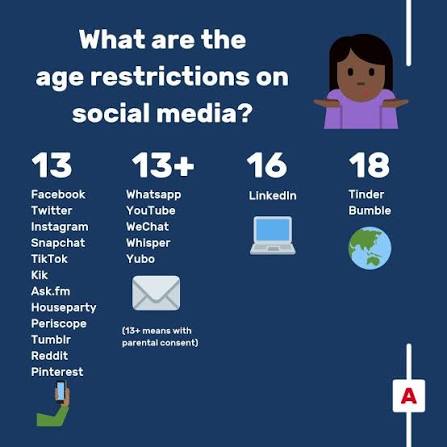
If an app says 13+, it is not designed for primary-aged children to hold their own standard account.
We know that children may hear about these apps from friends, siblings and online content. Our aim isn't to make parents feel judged about technology use, but to give families the information they need to make informed decisions.
We encourage parents and carers to:
✓ Check the minimum age before creating an account;
✓ Always enter your child's correct date of birth;
✓ Explore new apps and games together;
✓ Check privacy and communication settings;
✓ Know who your child is communicating with online;
✓ Turn off or restrict chat where appropriate;
✓ Set appropriate spending controls;
✓ Encourage your child to tell you if anything online worries or upsets them.
Remember: A minimum account age or game rating is only one part of deciding whether something is right for your child. Consider the content, whether children can communicate with strangers, in-app purchases, advertising and your child's individual maturity.
Quick guide for parents
| App / Game | Age information | What parents should know |
|---|---|---|
| TikTok | 13+ | TikTok says users must be at least 13. Accounts belonging to children under 13 may be removed. TikTok |
| Snapchat | 13+ | Snapchat requires users to be at least 13, subject to regional requirements. Snapchat Support |
| Discord | 13+ minimum | Users must be at least 13 and meet any higher minimum age required in their country. Discord Support |
| YouTube | 13+ for independent use | For children under 13, Google provides YouTube Kids and parent-managed/supervised YouTube options. Google Help |
| Roblox | Accounts from age 5+ | Roblox now uses age-related experiences and controls. Parents can link their own account and manage content, communication, friends and other settings. Roblox Support |
| Minecraft | PEGI 7 | Minecraft is rated PEGI 7 in the UK. Online multiplayer, friends and chat introduce additional considerations, and parental controls are available through Microsoft/Xbox settings. Minecraft.net |
| Fortnite | Check the rating of the experience |
Different Fortnite experiences can have different ratings. Epic parental controls can restrict content, chat, purchases and play time. Epic Games Safety Centre |